|
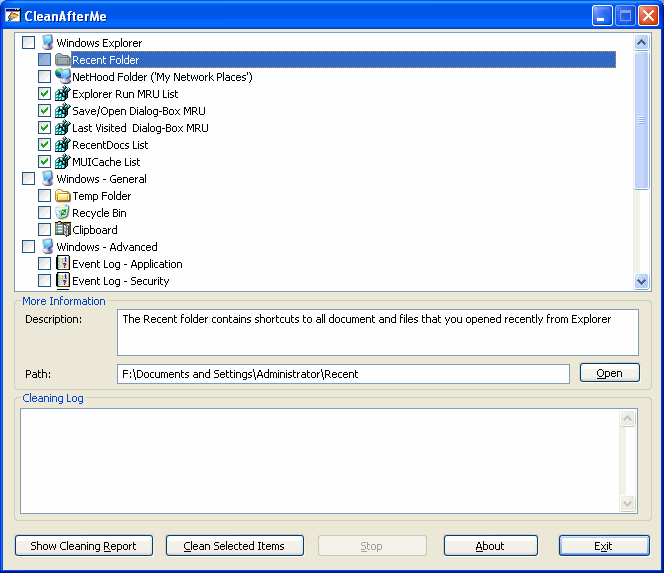
CleanAfterMe allows you to easily clean files and Registry entries that are automatically created by the Windows operating system during your regular computer work.
With CleanAfterMe, you can clean the cookies/history/cache/passwords of Internet Explorer, the 'Recent' folder, the Registry entries that record the last opened files, the temporary folder of Windows, the event logs, the Recycle Bin, and more.
CleanAfterMe is a portable application. This means that you can run it without any installation and without leaving any trace in the Registry.
You can also run this program from a USB flash drive: In order to do that, simply copy the executable file of CleanAfterMe (CleanAfterMe.exe) into the USB flash drive, and run it from there.

Keywords: clean, files, registry, history, cookies, recent
|
Click to enlarge
|
Related programs in System Utilities - System Maintenance |
|
Mihov Index Maker
A program that creates a HTML file containing links to all files in the folder.
|
|
PureSync
Easily synchronize, compare files and folders - with preview and automatic sync
|
|
iCopyExpert
iCopyExpert Copy songs from iPod to computer, or import to iTunes.
|
|
Split JSON Files Into Multiple Files Software
Split one or more JSON files into smaller ones.
|
|
TurboSplit
The fastest file splitter on the planet!
|
|
QuickWiper
QuickWiper is a disk and file wipe utility with integrated system cleaner.
|
|
RAID Reconstructor
Recover Data From A Broken RAID Level 5 or 0 Array
|
|
Civil War Quotes, Notes, and Facts
Quotes, notes, and facts of the Civil War. Text-To-Speech, this software talks.
|
|
Space Searcher
Find out how much garbage you store on HDD and save money on the next upgrade!
|
|
Optimum XP
Easily accelerate, secure, customize and tweak XP with powerful hidden settings.
|
| 


 Web Page Thumbnails 2.8.0: Free software to easily capture thumbnails of web pages