|
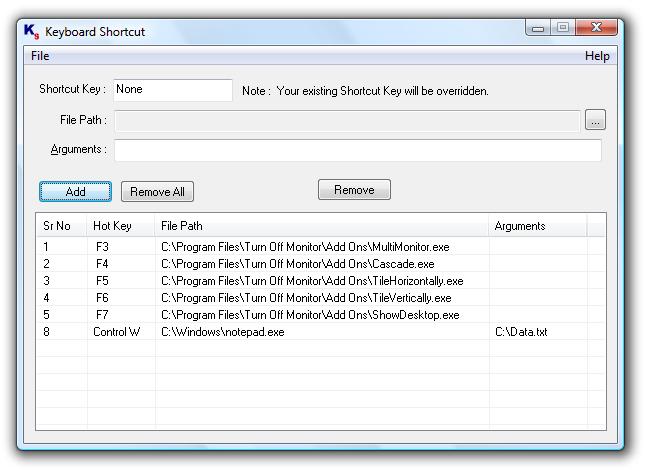
Open Programs and pass command line arguments with a simple key press on the keyboard. Create Shortcuts / Hot Keys to Launch applications / open document files by pressing user defined hot key / keyboard shortcut. Keyboard Shortcuts created in this utility are displayed in a list which can be helpful to view list of keyboard shortcuts along with shortcut key & the program / document for which they are configured. You can remove previously defined keyboard shortcut(s) from the main screen of the application. Keyboard Shortcut Utility has no Nagging popups and the utility starts in system tray as an icon & does not occupies space in task bar. The Keyboard Shortcut Utility will be launched automatically when you log on to your account on windows and you can start using keyboard shortcuts easily.

Keywords: keyboard shortcut, keyboard shortcuts, ceate shortcut, keyboard, shortcut, download, software, utility
|
Click to enlarge
|
Related programs in System Utilities - Launchers & Task Managers |
|
No-Keys
Onscreen computer keyboard. Type with a mouse.
|
|
NirExt
Adds 3 useful context menu extensions to your Windows Explorer environment.
|
|
PowerClick
PowerClick provides shortcut to Windows power features.
|
|
Montage
work faster & easier by visually organizing applications, files, and web links
|
|
WinScheduler, Standard Edition
Schedule macros to do repetitive tasks at defined time or on specific event
|
|
MacroToolbar, Standard Edition
Run powerful macros from customizable and application specific toolbars
|
|
ClickyMouse, Standard Edition
Define mouse actions to start macros capable to perform variaty of tasks
|
|
I Hate This Key Deluxe Edition
Protect yourself from accidentally pressing unwanted key combinations.
|
|
Anasoft Helena
Helena is a system level instruction engine which can increase your productivity
|
|
AutoLogonWindow
Secure passwords in convenient Tray Icon application to auto-logon to websites.
|
| 


 Web Page Thumbnails 2.8.0: Free software to easily capture thumbnails of web pages