|
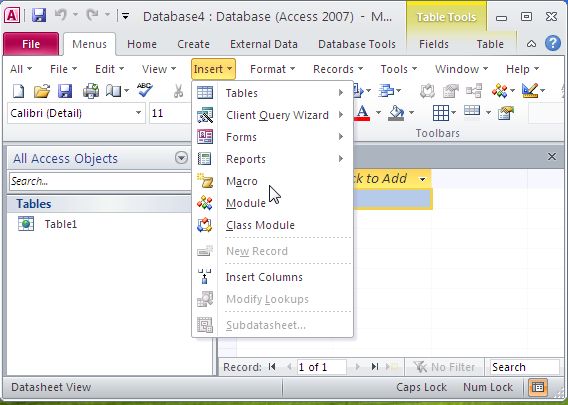
Classic Menu for Access 2010, an Office add-in designed for Microsoft Access 2010, brings the menus and toolbars of Access 2003 into the Ribbon of Microsoft Access 2010, adds a "Menus" tab at the far left of the menu bar and allows you to work with Access 2010 as if it were Access 2003.
All classic menu items of Access 2003 are well displayed as a group in the tool bar of the Ribbon, while all new features and commands of Microsoft Access 2010 are added to the classic style interface.
The software allows you to work with Access 2010 as if it were Access 2003. It shows the familiar classic menus and toolbars on the ribbon of Microsoft Access 2010. If you were using Access 2003 before, you don't need training or tutorials after upgrading to Microsoft Access 2010 with this add-in now.
User can browse the whole menus with keyboard shortcuts (insert Q into the original shortcuts of Office 2003. For example: press Alt + T to open the "Tools" menu in Access 2003, you just need to press Alt, Q, T to open the "Tools" menu in Access 2010).
The software supports all languages that are supported by Microsoft Access 2010: English, French, German, Italian, Spanish, Portuguese, Japanese, Dutch, Chinese, and more. It automatically shows the menus and toolbars in the language of your Microsoft Office 2010.
Fully compatible with Windows 7 32/64, Vista 32/64, X 32/64, Windows 2003 and 2008 Server.
Combine 32-bit and 64-bit Classic Menu into one single Exe installation package, so that users don't need to know whether they are using 32-bit or 64-bit Microsoft Office 2010.
You can enable or disable the classic menus and toolbars in an easy way. And the Classic Menu Manage center can help you quickly configure the setting.
Easy install and uninstall.
Easy to show or hide tabs of Ribbon.
The Access 2010 build-in tabs and groups on the ribbon are available at all times.
The Classic Menu for Microsoft Access 2010 is very stable and strong.

Keywords: Microsoft Access 2010, Access 2010, Menu, Toolbar, Classic, Interface, Ribbon, Office 2010
|
Click to enlarge
|
Classic Menu for Access 2010 5.00 |
Author: | Addintools
Other programs by Addintools
|
Downloads: |
651 |
Size: |
6665K |
Cost: |
$15.00 US |
Users Rating: |
 Reviews (0) Write review Reviews (0) Write review
|
Feedback: |
Report broken download Report spyware [?] |
License: |
Shareware [?] |
Operating Systems: |
 
|
Release Status: |
update (2012-03-09) |
Recent Changes: |
The recent files and recent folders command items have been included.
Combine 32-bit and 64-bit Classic Menu into one single Exe installation package, so that our customers don't need to know whether you are using 32-bit or 64-bit Microsoft Office 2010. |
Supported Languages: |
English, Arabic, Chinese, ChineseSimplified, ChineseTraditional, Czech, Danish, Dutch, Finnish, French, German, Greek, Icelandic, Irish, Italian, Japanese, Korean, Latin, Norwegian, Other, Polish, Portuguese, Romanian, Russian, Slovak, Slovenian, Spanish |
Additional Requirements: |
MS Access 2010 or Office 2010 installed |
Related programs in Business - Databases & Tools |
|
jQuery Horizontal Menu Style 05
Create jQuery Horizontal Menu for your Website with beautiful effects easily!
|
|
Xara Webstyle
A quick and easy way to produce quality web graphics - no skill required.
|
|
Pong
Classic Pong game invented in 1958 by Will Higinbotham at Brookhaven National La
|
|
SOCKShell
Adds pre-defined and your own options to the Windows Explorer context menu.
|
|
Creative DW Vertical Menu
SEO Friendly, over 30 unique skins + WEB20 styles,100% customizable, easy to use
|
|
NirExt
Adds 3 useful context menu extensions to your Windows Explorer environment.
|
|
jQuery CSS Menu Style 06
Create jQuery CSS Menu for your Website with beautiful effects easily!
|
|
1st TurboRun
One-click access to any program, document, file or website. 1st TurboRun!
|
|
eXtra Buttons
eXtra Buttons: Utility buttons in the title of the window
|
|
CodySafe CommPack
Set of portable applications for system administration and maintenance
|

 Web Page Thumbnails 2.8.0: Free software to easily capture thumbnails of web pages