|
With Memory Viewer you can view your system memory configuration, without having to open the box! Not only does Memory Viewer show you the channel, dimm, size and speed....but it also shows you the type of memory: SDRAM, DDR, etc. Memory Viewer can save you time by telling you detailed information about the memory cards installed in your computer, as well as the current memory allocation. Check out the screenshots to see what we are talking about.
With Memory Viewer you can get information such as the physical location on the motherboard, channel, dimm number, device type, bank locator, synchronous type, dimm factor, chip size, memory speed, total width, manufacturer, serial number, asset tag, part number and more. Memory Viewer retrieves the most information from your Windows system memory.

Keywords: memory, view, viewmemory, viewmem, ddr, sdram, ram, vrram, virtual, system, configuration, machine, installed, size, speed, mhz, bank locator, form factor, device type, dimm, channel, serial number, address, range
|
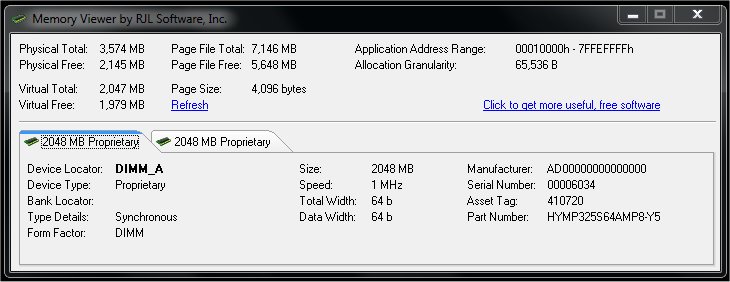
Click to enlarge
|



 Web Page Thumbnails 2.8.0: Free software to easily capture thumbnails of web pages