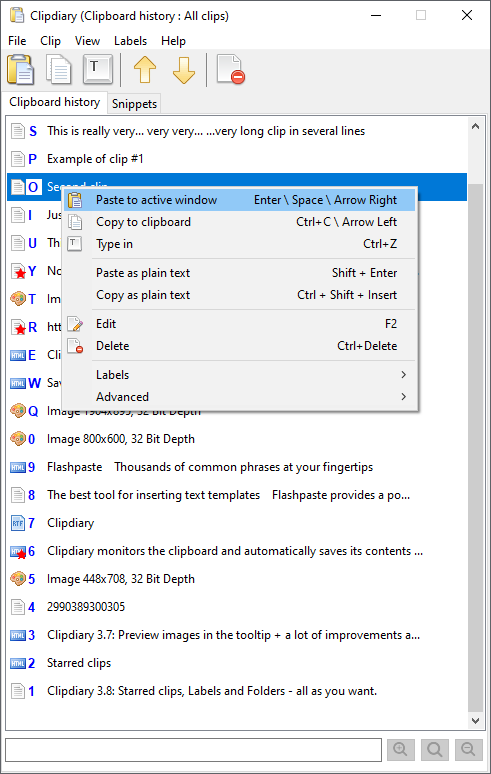
Clipdiary is a clipboard tool for keeping the clipboard history. Install our clipboard utility and you will never lose data once copied. Clipdiary will record everything you place to clipboard into database and you can easy copy data back
The contents of the system clipboard constantly change as you use it to copy and paste various information. But your data isn't stored for a long time - when you turn off the computer or just copy some other text, the data is lost. Usually, that isn't a big problem, but have you ever needed the data you copied 30 minutes or an hour ago? Maybe your computer is hanging and the program hasn't saved the data. Or you may simply want to recall what you were doing at the computer a month or a year ago. There are many cases in which you might want to restore your clipboard content. We suggest a nice solution.
Install our clipboard utility and you will never lose data once copied. This clipboard tool, which runs on Windows startup, will record everything placed on the clipboard into the database. All you have to do is press the Hot key combination or click the program icon in the system tray.
Clipdiary can log clipboard history and record data in several formats: plain text, RTF (Rich Text Format) and images (BMP), html, files and so on. So, besides saving parts of text, you can easily make series of screenshots, and Clipdiary will save them for you.
Added: 4 new global hot key combinations (see Options - Hot keys)
Added: Shortcuts for quick select clip\template in main window
Added: A new feature - view\edit clip




 Web Page Thumbnails 2.8.0: Free software to easily capture thumbnails of web pages