|
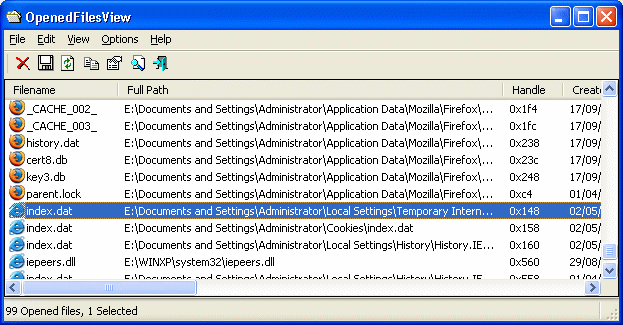
OpenedFilesView displays the list of all opened files on your system. For each opened file, additional information is displayed: handle value, read/write/delete access, file postion, the process that opened the file, and more...
Optionally, you can also close one or more opened files, or close the process that opened these files.
This utility is especially useful if you try to delete/move/open a file and you get one of the following error messages:
* Cannot delete [filename]: There has been a sharing violation. The source or destination file may be in use.
* Cannot delete [filename]: It is being used by another person or program. Close any programs that might be using the file and try again.
When you get one of these error messages, OpenedFilesView will show you which process lock your file. Closing the right process will solve this problem. optionally, you can also release the file by closing the handle from OpenedFilesView utility.

Keywords: opened, files, locked, release, close, sharing violation, handle
|
Click to enlarge
|
Related programs in System Utilities - Other |
|
Mihov Index Maker
A program that creates a HTML file containing links to all files in the folder.
|
|
PureSync
Easily synchronize, compare files and folders - with preview and automatic sync
|
|
iCopyExpert
iCopyExpert Copy songs from iPod to computer, or import to iTunes.
|
|
Split JSON Files Into Multiple Files Software
Split one or more JSON files into smaller ones.
|
|
TurboSplit
The fastest file splitter on the planet!
|
|
QuickWiper
QuickWiper is a disk and file wipe utility with integrated system cleaner.
|
|
RAID Reconstructor
Recover Data From A Broken RAID Level 5 or 0 Array
|
|
Space Searcher
Find out how much garbage you store on HDD and save money on the next upgrade!
|
|
Free File Shredder Software
Use free file shredder software to permanently delete files
|
|
FastSum
An extremely fast utility for your files integrity control.
|



 Web Page Thumbnails 2.8.0: Free software to easily capture thumbnails of web pages