|
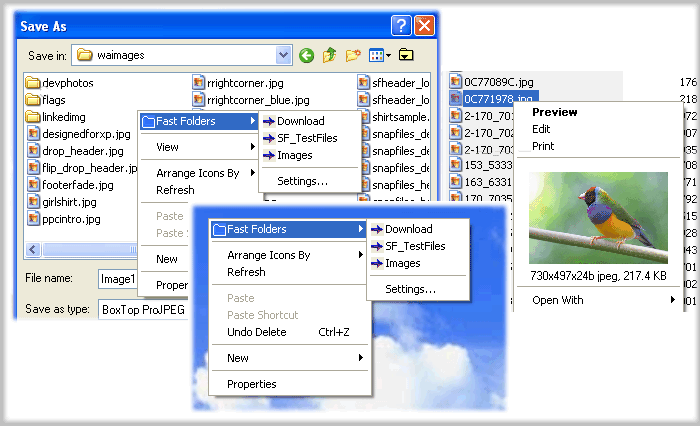
Fast Folder Access is a shell enhancement that gives you quick jump to your favorite folders in Common Open/Save dialogs, in Windows Explorer, the desktop and the Start Button.You access the Fast Folder menu by right-clicking anywhere in the File,Directory,directory background (right pane) of Windows Explorer, the "white area" of Common Open/Save -dialogs,on the desktop and the Start button.
In the menu that pops up, there will be a new item called "Fast Folders" with a list of folders that you have added from within Fast Folder Access or from the item "Add to Fast Folder" on the pop-up menu by right-clicking the directory in Windows Explorer. Then you can fast and easy browse these folders.
It's also an add-on for viewing images in Windows Explorer that lets you right-click on an image file to bring up a miniature image and image file information.
Also you can add any file as shortcut to Quick Launch or create new folder.Having created the new folder, you can add or drag the shortcuts to this new submenu.
Fast Folder Access runs automatically as part of the Windows Explorer context menu, so you will never need to start the program otherwise you want to edit the list of folders.

Keywords: fast access, access folder, jump folder, favorite folder, change folder, folder express, open folder, image viewer, right click
|
Click to enlarge
|
Related programs in System Utilities - Shell Tools |
|
Folder Guide
Handy utility that provides fast access to your frequently used folders.
|
|
Microangelo On Display
Change icons easily with On Display! Designed for Windows 8, Windows 7 and XP.
|
|
FolderHighlight
Highlight folders with a color of your choice, change folder color.
|
|
FolderChanger
The Easiest Way to Make Your Computer Folders Beautiful.
|
|
Quick Access Folders & Files
Desktop enhancement and File Dialog Utility will help you Quick Access resource
|
|
Aml Maple
Aml Maple is a modern indicator of the active keyboard layout (current language)
|
|
Key Transformation
Customize keyboard layout; Change key on keyboard; On screen keyboard.
|
|
Chameleon Window Manager Lite
Add customizable buttons to the title bars of the windows
|
|
Actual Title Buttons
Teach your windows new tricks to keep them well-ordered on your desktop.
|
|
Actual Virtual Desktops
Create an activity-focused work environment, organize and expand your workspace.
|



 Web Page Thumbnails 2.8.0: Free software to easily capture thumbnails of web pages